Its the thing of the moment, so they say. Kubernetes. What is it?
According to Wikipedia it is –
Kubernetes is an open-source container orchestration system for automating software deployment, scaling, and management. Google originally designed Kubernetes, but the Cloud Native Computing Foundation now maintains the project.
Digging deeper –
Kubernetes defines a set of building blocks (“primitives”) that collectively provide mechanisms that deploy, maintain, and scale applications based on CPU, memory[29] or custom metrics.[30] Kubernetes is loosely coupled and extensible to meet different workloads. The internal components as well as extensions and containers that run on Kubernetes rely on the Kubernetes API.[31] The platform exerts its control over compute and storage resources by defining resources as Objects, which can then be managed as such.
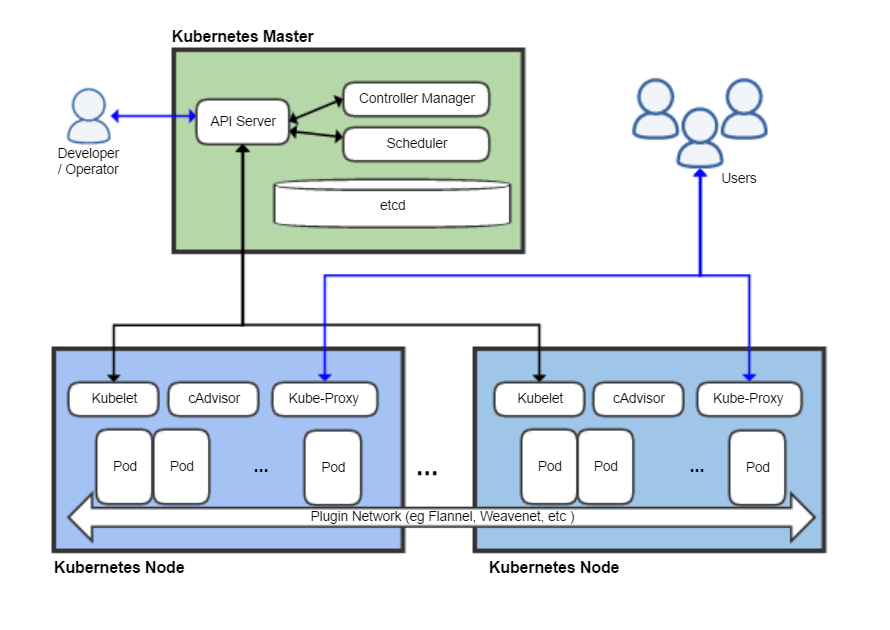
So as I see it this is not a million miles different to “Docker”, in terms of Containerisation. But adds the flexibility to host in the cloud and with considerable flexibility to add redundancy, so to protect mission critical tasks from Hardware fail-over.
So, my quest is to attempt to build a Kubernates cluster in my home lab!
With reference to my recent posting about my JARVIS2-PROX server implementation. I have the ability to build multiple linux servers in my own environment. So I have the means to achieve this, I hope.
But now I need to understand what I can do with this. It would appear that the engines of achievement are inside the components known as “Pods”.
The basic scheduling unit in Kubernetes is a pod,[45] which consists of one or more containers that are guaranteed to be co-located on the same node.[31] Each pod in Kubernetes is assigned a unique IP address within the cluster, allowing applications to use ports without the risk of conflict.[46] Within the pod, all containers can reference each other. The containers can be running in different IP segment as well. However, for a container within one pod to access another container within another pod, it has to use the pod IP address. However, pod IP addresses are ephemeral; hence an application developer should never use hardcoded pod IP addresses because the specific pod that they are referencing may be assigned to another pod IP address on restart. Instead, they should use a reference to a service (see below), which holds a reference to the target pod at the specific pod IP address.
A pod can define a volume, such as a local disk directory or a network disk, and expose it to the containers in the pod.[47] Pods can be managed manually through the Kubernetes API, or their management can be delegated to a controller.[31] Such volumes are also the basis for the Kubernetes features of ConfigMaps (to provide access to configuration through the file system visible to the container) and Secrets (to provide access to credentials needed to access remote resources securely, by providing those credentials on the file system visible only to authorized containers).
Note the shameless nicking of quotes from Wikipedia there. Credit to them and I have contributed to the cause.
Note the word Containers. I need to understand these. This brings me into the world of “Docker”. A further quotation discovers why.
Kubernetes works with Docker, Containerd, and CRI-O.[7]
Do not worry, I am not learning from Wikipedia, I just use its useful quotes.
So my first task is to explore Docker and understand how it works. That is for another post.