
So my quest brings me to understanding “Docker”, running on Linux. What is Docker?
Docker is a set of platform as a service (PaaS) products that use OS-level virtualization to deliver software in packages called containers.[5] The software that hosts the containers is called Docker Engine.[6]
So I will cut a long story short. Taking a standard installation of Linux server, in this case a Ubuntu 22.04 VM, I installed the Docker engine. Then I use Command Line instructions to build containers of functionality. These pull in “images”, which could be Containers in their own right but can also be pulled together as a collective into one container. I’ll get to an example of that in a moment.
What are these containers then? Well, they are an isolated bundles of software functionality, which include all their dependent libraries. This forms the layer 2 of the operating system, but does not include layer 1, which is the Kernel. The Container has connectors that allow it to interface with the host machine, via the Docker Engine. It is not quite a virtual machine, more like a virtual application.
Example, the Apache2 Web Server, known as HTTPD, can be pulled in from the Docker library of containers. It is already configured, has all the dependencies it needs. All that is needed is to feed it the website configuration and the content. This can been done very quickly.
The reason for doing this? Take building a Website. We will need a web server, maybe a file system, possibly a Sequal database. Well, we could install a virtual machine platform on our server, build and configuring Virtual Servers on that for each function we require, and then connecting them all together. Spend ages getting it all to work.
Alternatively we use Docker, build the whole system in a configuration file, a “docker-compose.yml” file to be exact. Then we build the complete image. Finally we run the image, upon which it becomes a container. It holds everything and is pretested.
Another good reason for doing this is that the software stack is smaller and hence faster.
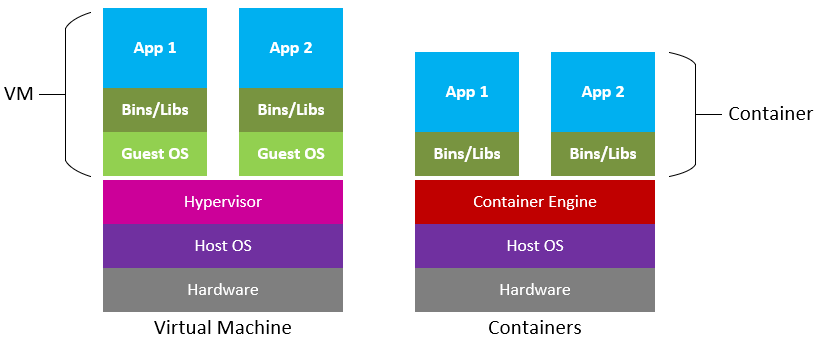
There is only one Kernel. To build containers is easy compared to building VMs and connecting them together.
Okay, a frustrating example. With my VM server, pre-installed with Docker. I create a folder called “wordpress” and enter it. Then I create the file called “docker-compose.yml” and I enter the following –
version: '3.3'
services:
    db:
      image: mysql:5.7
      volumes:
        - db_data:/var/lib/mysql
      restart: always
      environment:
      MYSQL_ROOT_PASSWORD: catsrule
      MYSQL_DATABASE: CATDATA
      MYSQL_USER: dave
      MYSQL_PASSWORD: catsrule
    wordpress:
      depends_on:
         - db
      image: wordpress:latest
      ports:
        - "8000:80"
      restart: always
      environment:
         WORDPRESS_DB_HOST: db:3306
         WORDPRESS_DB_USER: dave
         WORDPRESS_DB_PASSWORD: catsrule
         WORDPRESS_DB_NAME: CATDATA
volumes:
    db_data: {}
Okay, so then I save this file and then run the following command –
>docker-compose up -d
What does this do?
Builds, (re)creates, starts, and attaches to containers for a service. Unless they are already running, this command also starts any linked services.
Then I point a web browser to the VMs IP address at Port 8000. http://192.168.1.121:8000
And I have the start up screen for WordPress. This site runs on WordPress and took several days to build. For what I did above, ten minutes!
I created the site and called it “Crumbles Pong Box”!
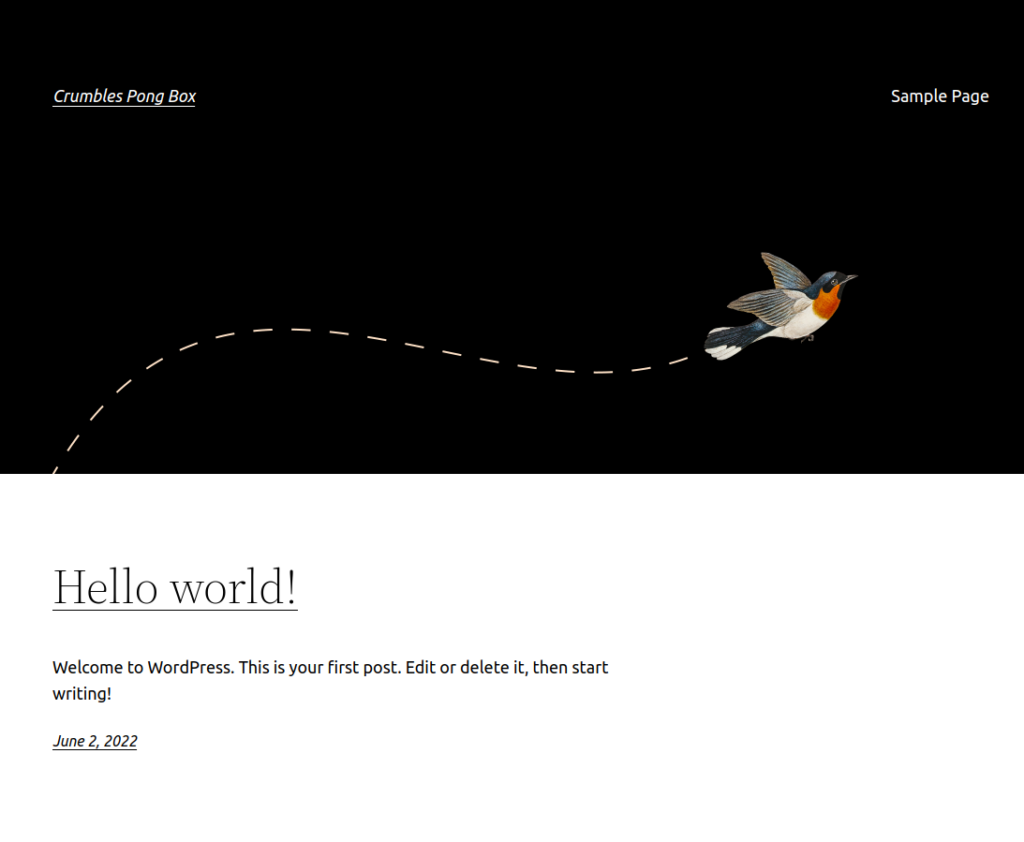
And there it is, ready to role.
More to follow.