
I want to start experimenting with building a home lab cluster of servers. Clearly buying loads of servers is not a practical solution here as I don’t need that level of performance, nor have the space or the power budget. Instead I look to Virtualisation.
I have run virtual servers before and this website was run on a virtualised server for a long while. Then I had an Enterprise server, running Linux, which in turn was running “Virtual Box”, a virtualisation environment. Within that I built another virtual Linux server, and on that I built the website. It worked but it wasn’t exactly efficient.
Since then, and with the price of fuel going astronomical I have moved the website to a native Raspberry Pi 4, it uses a lot less juice, and I digress.
Now I want the ability to build several Linux servers so that I can experiment with “Containerisation” and “Kubernetes”, all within the four walls of my lab. So turning back to the silent Enterprise rack I have now repurposed one machine, known as “JARVIS-2”, this is a HPE DL380 Generation 7.
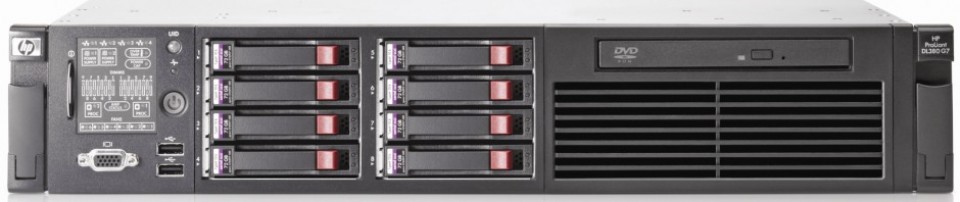
This is what I have done.
- The RAID disk configuration was erased and the disks removed. I then fitted two 72Gb disks in slots 1 & 2. I then fitted six 600Gb disks in slots 3 to 8. Then I configured the RAID controller to used the two 72Gb disks in “RAID 0+1” mode. This means they mirror each other so actually look like a single 72Gb disk, but with redundancy. I also made these disks “Bootable”. For the 600Gb disks I put them into “RAID 5” mode, which gives me about 2.6Tb. Its way more than I need but I have plenty of room.
- I then downloaded the latest image of the Hypervisor packaged known as “Proxmox”. Proxmox is a thin implementation of a custom build of Linux and its sole purpose to to installed natively on server hardware, and then host virtual machines, transparently. As with “Virtual Box” each machine is given resources from the hardware, but unlike “Virtual Box” you don’t need a host OS, as Proxmox IS the host OS.
- I built a Bootable FLASH drive with this ISO and used that to boot the server up. The installation allowed me to rename the machine “JARVIS2-PROX” and I installed Proxmox on the bootable 72Gb drive.
- Once up and running I attached the 2.6Gb disk into Proxmox and instructed it to use that space for the virtual machine configurations and disk images.
- Then I implemented a “Ubuntu server 22.04” virtual machine (VM) and mucked about with it until it was happily settled on the network. To implement that I set the network IP address as a static assignment, inside my networks domain range but outside the DHCP range.
- Following that I cloned this VM three times, in each clone I changed the IP static assignment to a unique number.
Having used JARVIS-2 for Folding@Home duties, something I have to reluctantly shelve as a project, again due to the power demands, I had to consider the mainboard configuration. The machine was configured for “Flat out” performance. Highest processor clock speed and high cooling. Noisy, hot and thirsty. So now it is set for “Low power”, which reduces the CPU clock rate by half, and set the cooling to “Optimised”. It is very quiet now and nowhere near as much heat.
So now I have my virtualisation platform and I can proceed with learning, experimenting and tripping over. More of this in future posts.